We look forward to welcoming you to Jeju, Korea!
Please learn about the NPC 2026 Onsite Information below.
Please learn about the NPC 2026 Onsite Information below.
Advisory Notice
for Overseas Participant
Advisory Notice
for Korean Participant
On-site Registration Information
Overview
- Online registrants should present "Registration Confirmation Sheet" to the registration desk.
- If you have not registered through the NPC 2026 website in advance, you must register on-site by scanning the QR code via your own phone.
- All participants are requested to wear the name badge throughout the conference period.
- Your name, affiliation, and country are printed on the name badge.
- Those who lose the name badge can be reissued at the registration desk.
Registration Desk Information
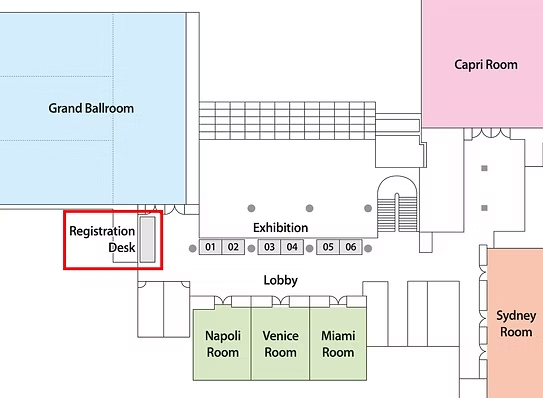
- Location: Grand Ballroom Lobby (2F), Paradise Hotel Busan (Location indicated by the red box below)
- Opening Hours:
| Date | Operating Hours |
|---|---|
| Sep. 22 (Mon) - 24 (Wed) | 08:00-16:00 |
| Sep. 25 (Thu) | 08:00-10:30 |
Registration Process
Present the "Registration Confirmation Notice*" to the registration desk.
Scan QR-code and check registration status
Receiving nametag with souvenir
(Final program is not provided.)
(Final program is not provided.)
* A registration confirmation sheet will be emailed one week prior to NPC 2025.
Registration Fee & Payment Method
- The following methods will be available: Credit card, Cash (KRW only)
- The registrants must prepare the exact amount based on the on-site registration fee, if they will pay by cash.
- On-site registration fee information:
| Category | Category (Sub) | On-site ('26. 11. 18 - 20) |
|---|---|---|
| Member* | Presenter | KRW 1,500,000 |
| Participant | KRW 1,900,000 | |
| Student** | KRW 1,200,000 | |
| Non-Member | Presenter | KRW 1,900,000 |
| Participant | KRW 2,400,000 | |
| Student** | KRW 1,500,000 |
* Member: Member registration fees apply to KNS and KPVP individual members.
** Student:
- Students only (who are pursuing a bachelor's, master's or doctoral course). Student ID or proof of enrollment must be issued in English.
- Those in Post Doc courses are not eligible for “Student" Registration.
Invoice, Receipt & Certificate
- For on-site registrants, online account information will be sent to you by email, and a receipt will be available on the website from the day after your registration.
- After logging in, click 'Invoice and Registration Confirmation' on the ‘Overview’ tab to print your invoice and receipt.
- For registration fee payers only, the attendance certificate can be downloaded from 'Overview' > NPC 2025 website from September 22 (Mon).
Create Your Own Schedule
You can create your own conference schedule by selecting the sessions that interest you according to the guidelines below.
Step 1. Click ‘Browse Conference Agenda’ after logging in to the website.
- Available on both PC and mobile versions.
- ONLY for those who have completed their registration fee payment.
- NOT available on the Daily Program page.
Step 2. Click ‘Plus (+) mark’ to add sessions to ‘My Agenda’.
Step 3. You can check your personal agenda by clicking ‘My Agenda’ on the blue menu bar at the top.
NPC 2026 E-proceedings
- Submitted final papers will be included in E-Proceedings with an e-ISBN number (979-11-955566-7-0(95550)).
- Only NPC 2026 registrants can view and download E-proceedings from September 22, and detailed information will only be provided to registrants later.